Salesforce
Write a record into Salesforce every time a session reaches a milestone — typically the verdict of the automated checks, so a case or process in Salesforce shows whether a delivery passed, has warnings, or failed, without anyone opening Expecto.
Direction: outbound only. Expecto authenticates with the OAuth 2.0 Client Credentials flow of your org's connected app and creates one sObject record per event, containing exactly the fields you map.
session event ──▶ outbound binding ──▶ Salesforce connection ──▶ POST /services/data/vXX.X/sobjects/<Object>
                  (which events,         (My Domain URL,
                   which object,          Consumer Key/Secret,
                   field mapping)         API version)
1. Prepare the Salesforce org
Everything below happens in Salesforce Setup and needs a Salesforce administrator. Expecto has no requirements on the org edition beyond API access.
Custom object and fields
Create (or pick) the object Expecto will write to, for example
ExpectoWebhookEvent__c, and the fields you want filled. A typical set:
| Field | Type | Filled from |
|---|---|---|
SessionId__c |
Text (36) | {{ session_id }} |
RunId__c |
Text (36) | {{ run_id }} |
Period__c |
Text | {{ period }} |
Status__c |
Picklist | {{ verdict }} through a value map |
Phase__c |
Picklist | {{ phase }} through a value map — technical (parse result) or content (business check) |
ProcessId__c |
Text / lookup key | {{ context.process_id }} — your own correlation id, passed in the session context |
Expecto sends only the mapped fields. Salesforce rejects a request that
names a field the object does not have (HTTP 400, INVALID_FIELD), so the
object must exist with every mapped field before the first delivery.
Restricted picklists
If Status__c is a restricted picklist, its values must match what
Expecto sends. Either add Expecto's verdict values (passed,
warnings, failed) to the picklist, or keep your own values and
translate with value_maps (step 3). A mismatch dead-letters the
delivery with INVALID_OR_NULL_FOR_RESTRICTED_PICKLIST.
Connected app with the Client Credentials flow
- Setup → App Manager → New Connected App (or External Client App Manager in newer orgs). Enable OAuth settings; any callback URL is fine — it is not used by this flow.
- Select the scopes Manage user data via APIs (
api). - Enable Client Credentials Flow and choose the Run As user. All records are created as this user, so give it a profile or permission set with Create on the object and Edit on every mapped field.
- Open the app's Manage Consumer Details page and copy the Consumer
Key and Consumer Secret. These are the OAuth
client_id/client_secretExpecto will use. - Note the org's My Domain URL (Setup → My Domain), e.g.
https://acme.my.salesforce.com. The token endpoint is<My Domain URL>/services/oauth2/token— it must be reachable from the internet over https.
2. Create the connection in Expecto
Settings → Connections → Add Connection, type Salesforce:
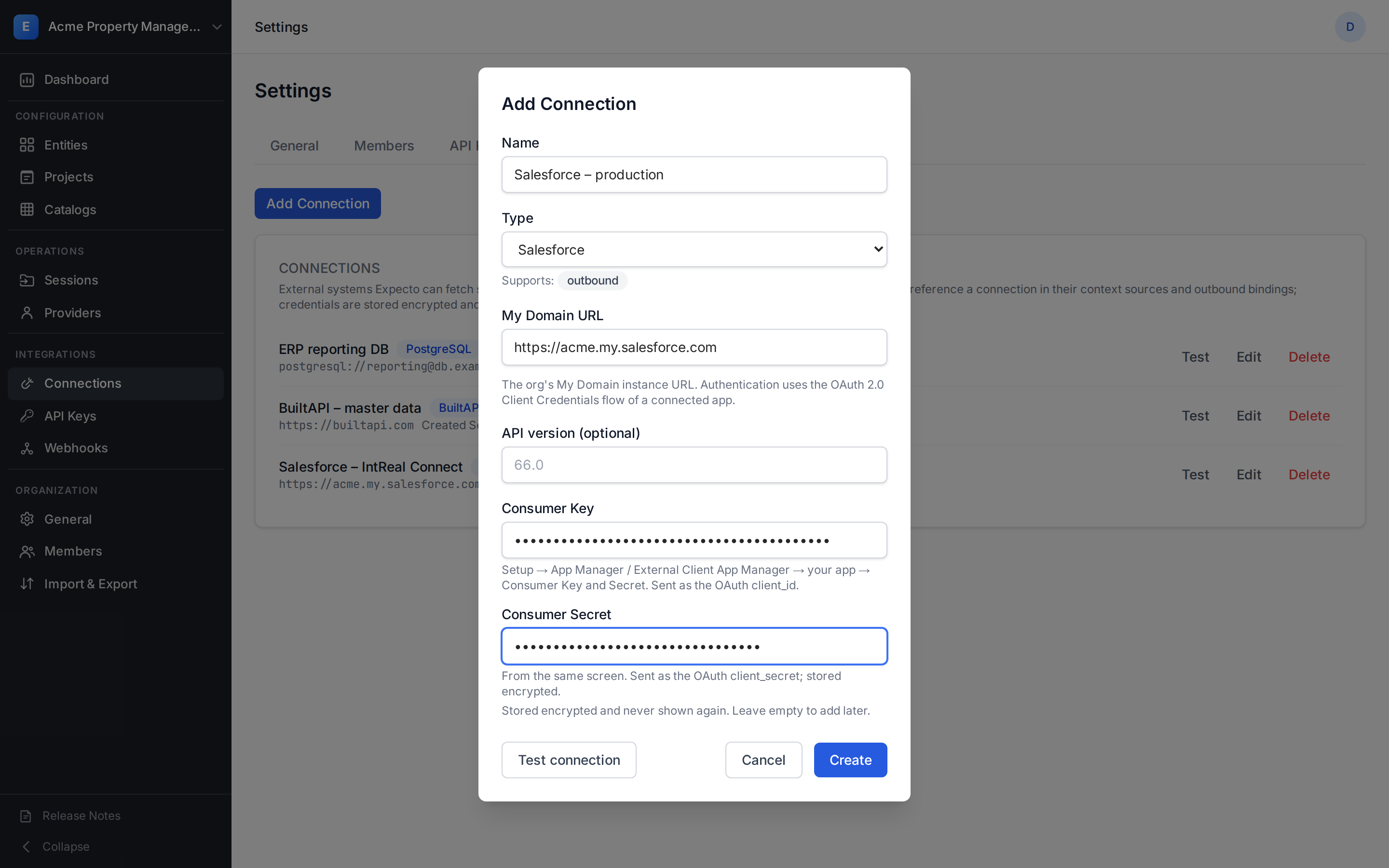
| Field | Value |
|---|---|
| Name | Anything that tells the connection apart, e.g. Salesforce – production |
| My Domain URL | The org's My Domain URL, https:// only, no path |
| API version (optional) | Salesforce REST API version, default 66.0 |
| Consumer Key / Consumer Secret | From the connected app. Stored encrypted, never shown again |
Click Test connection: Expecto requests a token and reports the result
without creating any record. auth_error means the Consumer Key/Secret
pair was rejected or the Client Credentials flow is not enabled for the
app; connection_error means the My Domain URL did not answer.
Through the MCP tool or API the same connection is:
POST /api/integration-connections
{
  "name": "Salesforce – production",
  "type": "salesforce",
  "base_url": "https://acme.my.salesforce.com",
  "config": { "api_version": "66.0" },
  "credentials": { "client_id": "<Consumer Key>", "client_secret": "<Consumer Secret>" }
}
3. Bind session events to the object
Open the project, Context page, card Outbound Bindings. A project can hold up to 20 bindings; each one names a connection, the events it reacts to, and the mapping.

Edit opens the inline editor:
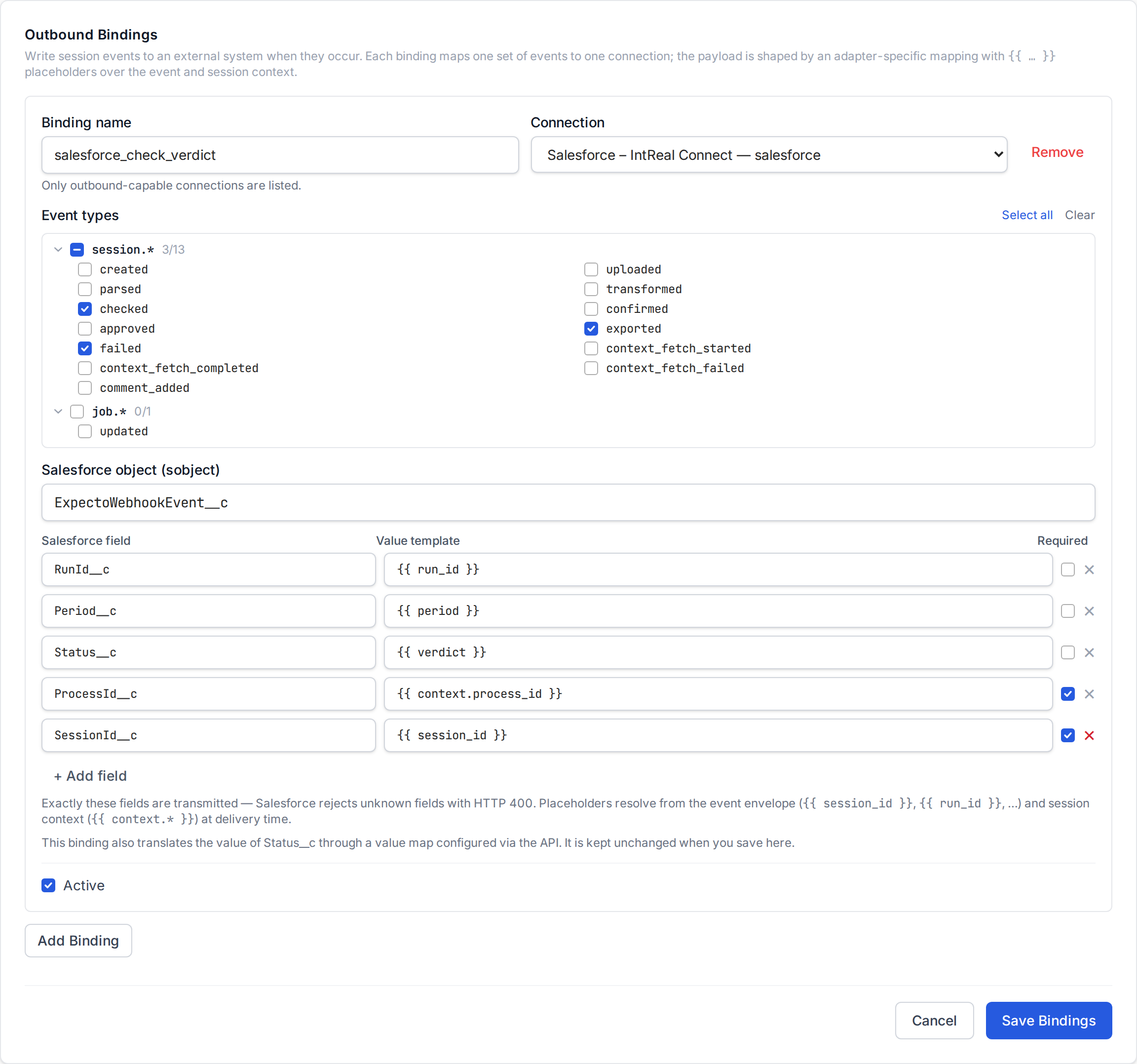
- Binding name —
^[A-Za-z][A-Za-z0-9_]{0,63}$, unique within the project. It appears in the delivery log. - Connection — only outbound-capable connections are offered.
- Event types — see which events carry what.
- Salesforce object — the API name of the object (
ExpectoWebhookEvent__c). - Fields — one row per Salesforce field: the field's API name and a value
template. A template is a literal, a placeholder, or text with placeholders
embedded (
FIBU {{ period }}). Tick Required for fields that must not resolve to an empty value. - Active — untick to pause the binding without deleting it.
The same binding as JSON, for PUT /api/projects/{id}/outbound-bindings or
the set_project_outbound_bindings MCP tool:
{
  "bindings": [{
    "name": "salesforce_check_verdict",
    "connection_id": "<connection uuid>",
    "events": ["session.parsed", "session.checked", "session.failed", "session.exported"],
    "mapping": {
      "sobject": "ExpectoWebhookEvent__c",
      "fields": {
        "Status__c":    "{{ verdict }}",
        "Phase__c":     "{{ phase }}",
        "SessionId__c": "{{ session_id }}",
        "RunId__c":     "{{ run_id }}",
        "Period__c":    "{{ period }}",
        "ProcessId__c": "{{ context.process_id }}"
      },
      "required_fields": ["SessionId__c", "ProcessId__c"],
      "value_maps": {
        "Status__c": { "passed": "Passed", "warnings": "Warnings", "failed": "Error", "*": "Error" },
        "Phase__c":  { "technical": "Technical", "content": "Content", "*": "Context" }
      }
    },
    "is_active": true
  }]
}
PUT replaces the whole list — send every binding of the project, and
{"bindings": []} to remove them all.
The mapping in detail
| Key | Required | Meaning |
|---|---|---|
sobject |
yes | Object API name: letters, digits, underscores, max 80 chars. |
fields |
yes | Field API name → value template. Non-empty. Exactly these fields are transmitted. |
required_fields |
no | Subset of fields. If any of them resolves to null or "", the delivery dead-letters before anything is sent, naming the field. |
value_maps |
no | Field → {rendered value: replacement} table applied after rendering and before the required check. "*" is the fallback for values not listed (including null). Keys must name mapped fields. |
Everything else is rejected at save time as an unknown key. Placeholders are
also validated at save time: every {{ context.<name> }} must be a scalar
declared in the project's context schema, and every envelope field must be
one of the known names.
Map verdict, not health
verdict is the outcome of the automated checks — passed,
warnings, failed, or null while there is none yet — and is stable
across later stages. health is the dashboard chip (created,
in_progress, blocked, attention, ready, completed); it mixes
progress with outcome and changes as the session moves on.
Two phases: technical result first, content result later
Salesforce usually calls POST /sessions/{id}/run a few seconds after
creating the session, while Expecto is still fetching the project's context
sources. Parse does not need that context, so it runs right away: within
seconds the binding receives the technical result — session.parsed
(phase = technical, parse_error_count / parse_warning_count) or
session.failed with stage = parse (a broken file, a missing required
column, a wrong encoding). The run then waits for the fetch before
transform: status waiting, waiting_for = context_fetch, same run_id.
Nothing to retry on the Salesforce side. When the fetch completes the run
continues by itself and the content result arrives as
session.checked or session.failed (phase = content). If the fetch
fails or the wait exceeds the server timeout (30 min by default), the run
closes as errors and session.failed arrives with stage =
context_fetch, reason = context_fetch_failed or context_fetch_timeout,
phase = context, and message naming the source and its error.
Map {{ phase }} to a picklist (Phase__c above) when Salesforce keeps the
two results apart; a binding that only needs the final verdict can leave
session.parsed out and ignore the field.
Which events to subscribe to
| Event | Fires when | run_id |
verdict |
|---|---|---|---|
session.parsed |
All files parsed — the technical result (phase = technical, parse counters) |
set | null / warnings |
session.checked |
Business rules ran without errors (phase = content) |
set | passed / warnings |
session.failed |
A pipeline stage failed (stage is parse → phase = technical; transform, validation_gating, validate, or check → phase = content), or the run halted at the context gate after parse (context_fetch, context_validation → phase = context); reason is a code, message explains |
set | failed; null for a gate halt — map it with the * default |
session.exported |
The package was generated | — | as at export |
session.confirmed, session.approved |
Human sign-off | — | as at that moment |
session.created, session.uploaded, session.transformed |
Other pipeline stages | session.transformed only |
null |
run_id exists only on pipeline-run events
A mapping that uses {{ run_id }} on an event without one (e.g.
session.created) dead-letters with the variable named. Either subscribe
the binding to run events only or leave RunId__c out of the mapping.
For the two-phase flow the practical set is session.parsed +
session.checked + session.failed; for the final verdict alone,
session.checked + session.failed. Add session.exported if Salesforce
should also learn that the package went out.
4. What Expecto sends
For each matching event, one delivery:
POST <My Domain URL>/services/oauth2/tokenwithgrant_type=client_credentials(form body — credentials never appear in a URL). The token is cached in process memory and reused; it is never persisted.-
POST <My Domain URL>/services/data/v66.0/sobjects/ExpectoWebhookEvent__cwithAuthorization: Bearer …and a JSON body of exactly the mapped fields after value maps:{ "Status__c": "Passed", "SessionId__c": "7c3a76c0-6a00-44a5-a0ad-9093e6d219e1", "RunId__c": "0e1c1c3e-3a5c-4b39-9d24-6d4a3e6b9a1f", "Period__c": "2026-08", "ProcessId__c": "PRC-000123" } -
A
201with{"id": "a0B…"}marks the delivery succeeded; the record id is stored on the delivery for audit.
Request timeout is 15 s per call. Redirects are not followed.
Error handling
Deliveries ride the shared webhook retry machinery (backoff from 30 s up to 1 h, 6 attempts, then dead-letter), but Salesforce responses are classified first:
| Salesforce answers | Expecto does |
|---|---|
5xx, 429 (API limit), timeout, network error, a 200 token response that is not JSON |
Retry with backoff — the same request may succeed later. |
| 401 on the record call | Refresh the token once and retry within the same attempt; a second 401 dead-letters as auth_error. |
| 400 (unknown field, bad value, picklist), 403 (no permission), 404 (wrong object name or API version) | Dead-letter immediately — a retry cannot succeed without changing the request. The first 2 KiB of the response body are kept on the delivery. |
| Token endpoint rejects the credentials | Dead-letter as auth_error; the response body is not stored because Salesforce echoes request parameters. |
After 10 consecutive dead-letters the binding is auto-disabled
(disabled_reason: consecutive_failures) and stops producing deliveries;
one success resets the counter. Re-activate it in the editor after fixing
the cause — the counter is reset when you save.
5. Monitor and replay
Settings → Webhooks lists every outbound binding of the organization next to the webhook endpoints, with its state badge — Active, Inactive, or Auto-disabled with the failure count. Actions → Show deliveries opens the log:
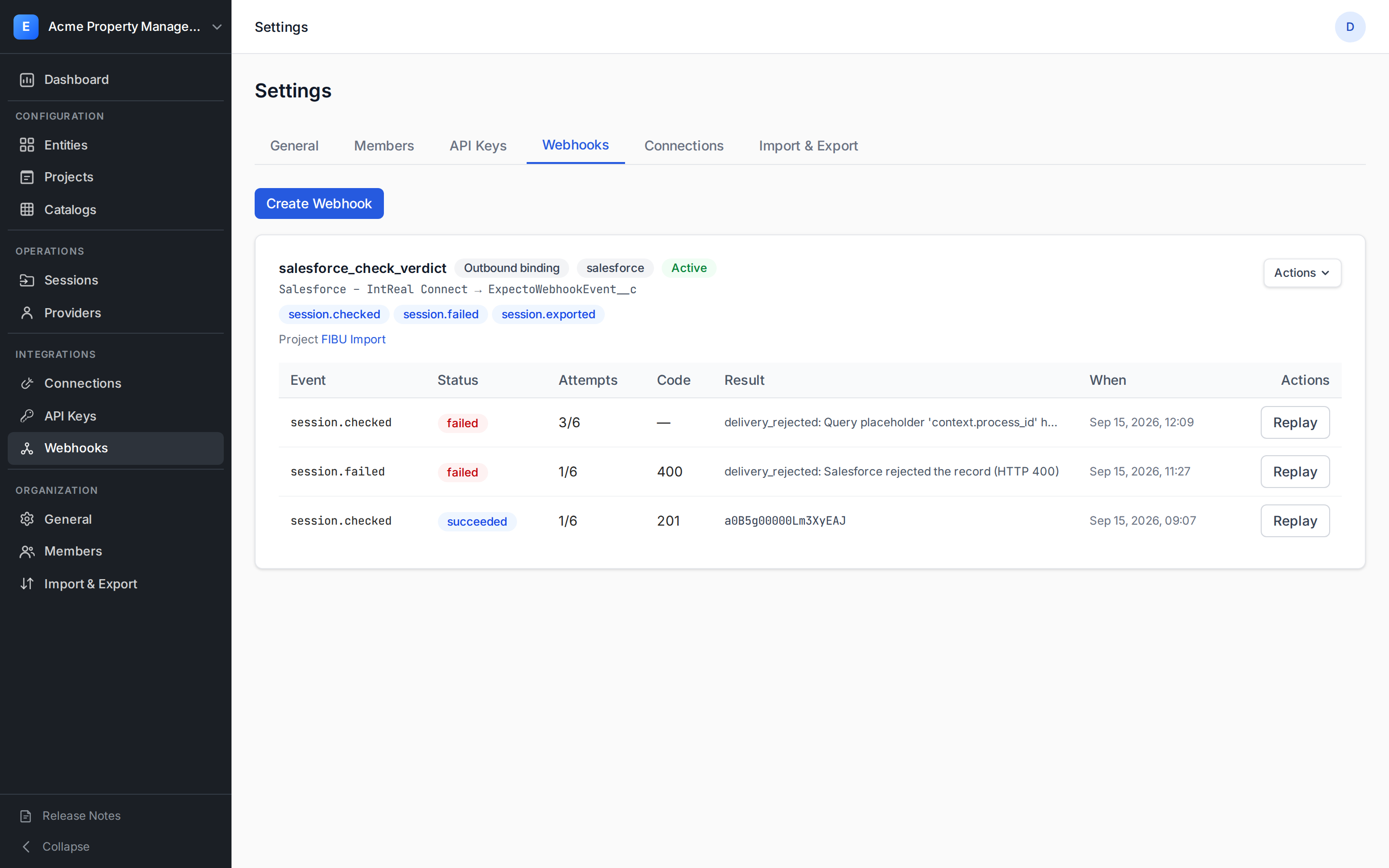
- Result is the Salesforce record id for a success, the error class and message for a failure (hover for the stored response excerpt), or the next retry time for a pending attempt.
- Replay re-runs the delivery through the adapter with the current binding and connection — use it after fixing a mapping or the Salesforce object. The replay is a new delivery linked to the original.
Programmatically: GET /api/webhook-deliveries?connection_id=<uuid> and
POST /api/webhook-deliveries/{id}/replay, or the list_webhook_deliveries
/ replay_webhook_delivery MCP tools.
Troubleshooting
| Symptom in the delivery log | Cause | Fix |
|---|---|---|
delivery_rejected … INVALID_OR_NULL_FOR_RESTRICTED_PICKLIST |
The rendered value is not in the picklist | Add a value_maps entry for the field, or extend the picklist. |
delivery_rejected … INVALID_FIELD / No such column |
A mapped field does not exist on the object | Fix the field API name (custom fields end in __c). |
delivery_rejected: Salesforce rejected the record (HTTP 404) |
Wrong sobject name or unsupported API version |
Check the object API name and the connection's api_version. |
delivery_rejected: Salesforce rejected the record (HTTP 403) |
The Run As user lacks Create on the object or Edit on a field | Adjust the user's permission set. |
auth_error: Token endpoint rejected the credentials |
Consumer Key/Secret wrong, the flow is disabled, or no Run As user | Re-check the connected app; rotate the secret in Edit. |
delivery_rejected: Query placeholder 'run_id' has no value |
The binding is subscribed to an event without a run | Restrict events to session.checked / session.failed or drop the field. |
delivery_rejected: Required mapping field(s) resolved to an empty value: … |
A required field rendered null — usually a context scalar the session did not set |
Provide the value in the session context, or untick Required. |
connection_inactive / binding_inactive |
The connection or binding was deactivated | Re-activate it; the delivery can then be replayed. |
| Binding shows Auto-disabled | 10 consecutive dead-letters | Fix the cause, re-activate the binding, replay the failed deliveries. |