Integrations
Expecto talks to external platforms in two directions:
- Context — before a delivery is processed, Expecto reads reference data from an external system and puts it into the session context: the previous month's balances from a data warehouse, a fund number from a master-data API, an exchange rate from a reporting database. Business rules and transformers then use those values like any other context.
- Outbound — when a session reaches a milestone (checks passed, a stage failed, the package was exported), Expecto writes a record into an external platform: a status record in Salesforce, a row in an operations table.
Both directions are built from the same three pieces.
The building blocks
| Piece | Lives on | What it holds |
|---|---|---|
| Connection | Organization (Settings → Connections) | How to reach one external system: type, URL or DSN, credentials, provider-specific config. Credentials are stored encrypted and never shown again. |
| Context source | Project (Project → Context) | A query against a connection with {{ … }} placeholders and the context table or scalar it produces. |
| Outbound binding | Project (Project → Context → Outbound Bindings) | Which session events to send to which connection, and how to shape the payload. |
A connection's type decides what it can do. Each type is implemented by an adapter that declares its capabilities:
| Platform | Type | Capabilities | Page |
|---|---|---|---|
| Salesforce | salesforce |
outbound | Salesforce |
| BuiltAPI | builtapi |
context | BuiltAPI |
| PostgreSQL | postgres |
context | PostgreSQL |
A context source must reference a context-capable connection and an
outbound binding an outbound-capable one; saving anything else is
rejected with a clear message. The current catalog with capabilities and
form fields is served by GET /api/integration-connections/types (and the
list_connection_types MCP tool), so clients never hardcode it.
Who can do what
| Action | Needs |
|---|---|
| Create, edit, test, delete connections; edit context sources and outbound bindings | The integrations:manage permission — held by the owner and admin roles |
| See outbound bindings and their delivery log under Settings → Webhooks | webhooks:manage (also owner/admin) |
Connections
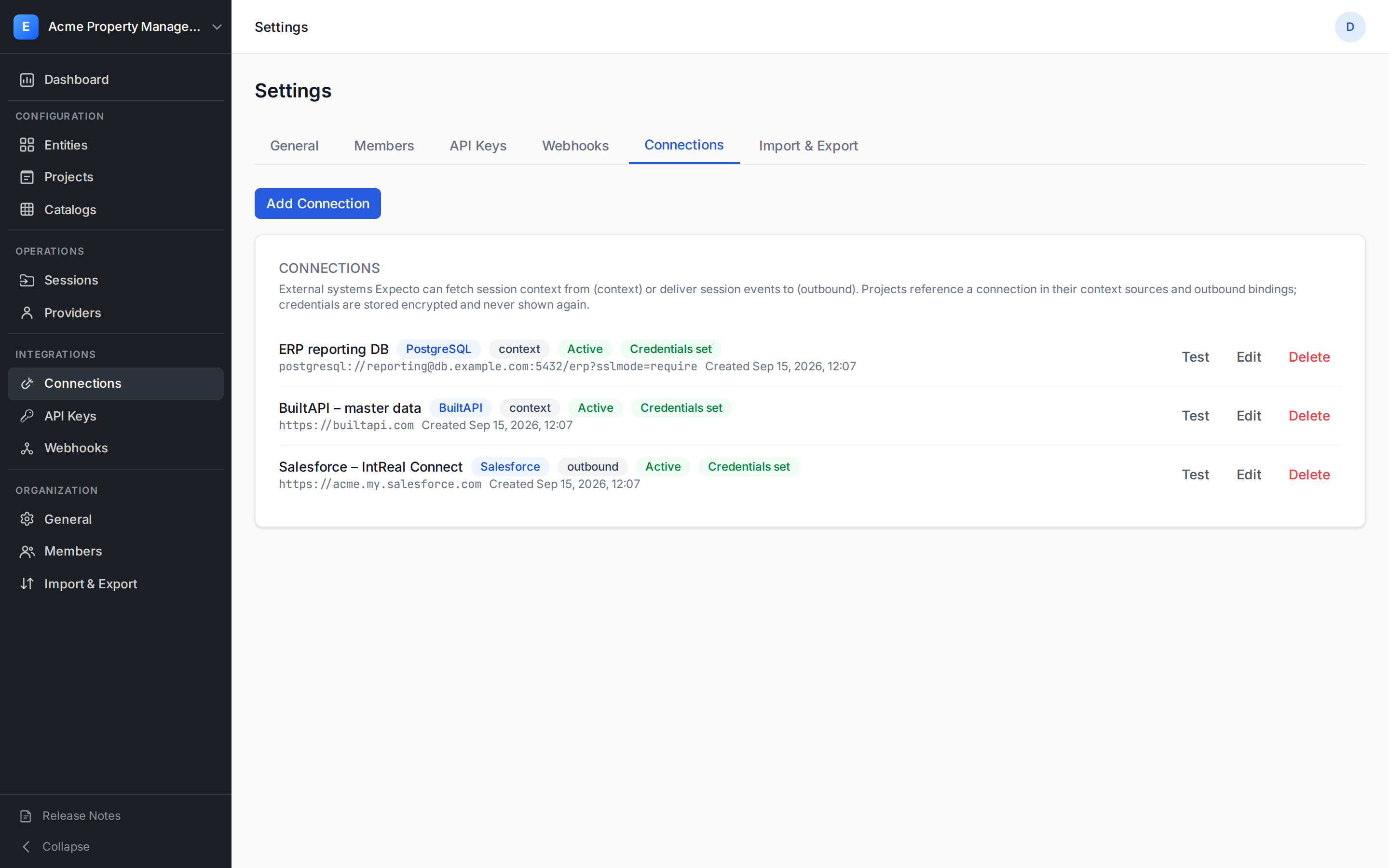
Open Settings → Connections. Each row shows the type, its capability
badge (context / outbound), whether it is active, and whether
credentials are set.
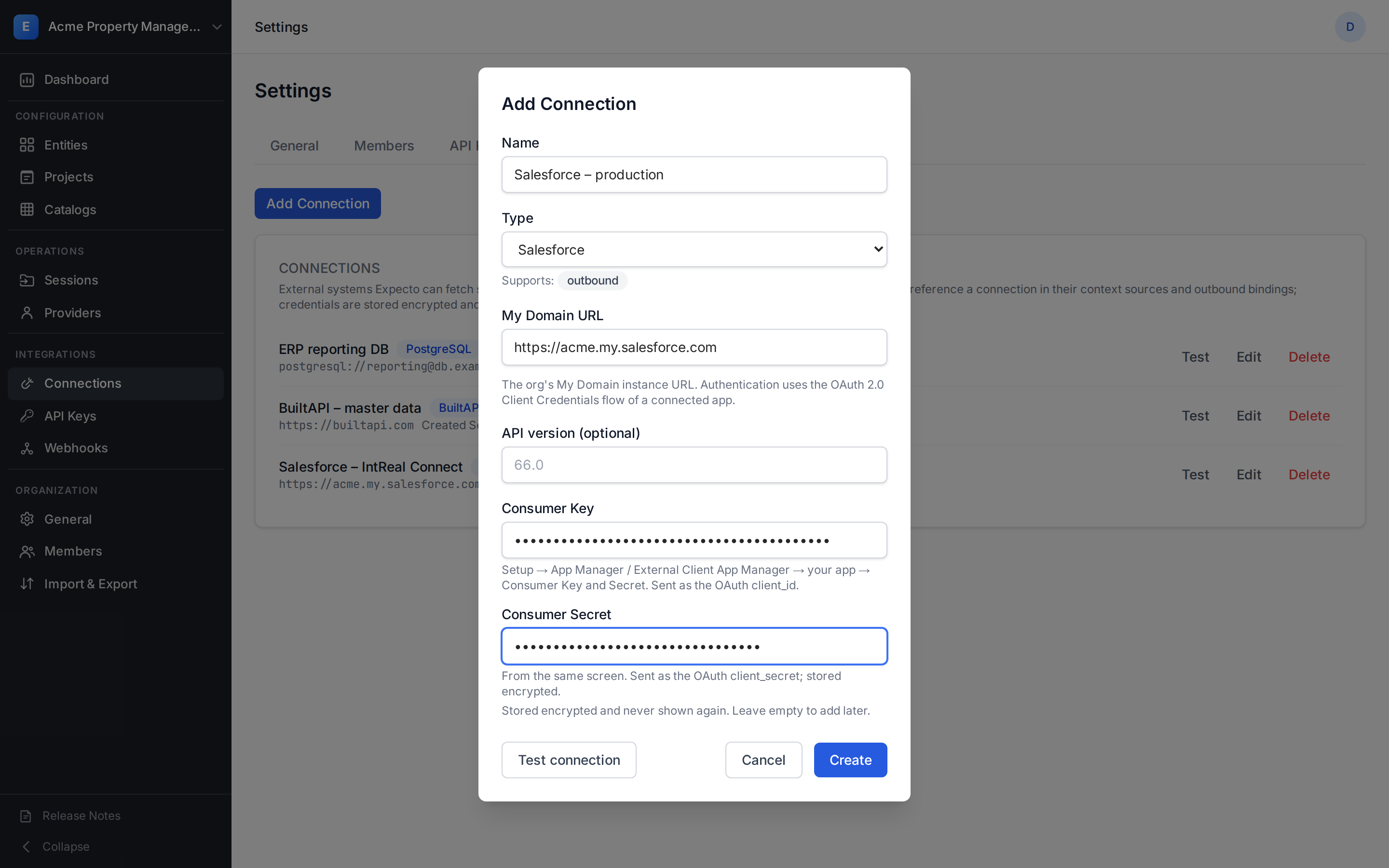
Add Connection opens a form whose fields come from the type catalog — pick the type first and the form adapts: a My Domain URL plus Consumer Key / Secret for Salesforce, a base URL plus service token and workspace id for BuiltAPI, a DSN plus password for PostgreSQL.
Credentials are write-only
Whatever you enter as a secret is encrypted at rest and is never
returned by any read operation — the API exposes only
has_credentials: true. To rotate a secret, enter a new one in
Edit; to clear it, use clear_credentials. Secrets never appear
in logs, delivery records, or error messages.
Test runs the cheapest authenticated call the platform allows without
changing anything on the other side: a token request for Salesforce, a
one-row list query for BuiltAPI, SELECT 1 inside a read-only
transaction for PostgreSQL. The result is one of:
error_kind |
Meaning |
|---|---|
| (ok) | Reached the system and authenticated. |
connection_error |
Unreachable, timed out, or answered 5xx. |
auth_error |
The credentials were rejected. |
query_error |
The connection config is incomplete (e.g. a missing BuiltAPI workspace_id). |
You can also test an unsaved payload before creating the connection —
the same Test connection button in the create dialog, or
POST /api/integration-connections/test with type, base_url,
config, and credentials.
Network rules
HTTP-based connections must use https:// and point to a public host: the
URL is resolved at save time and rejected if it lands in a private, loopback,
or link-local range, or carries user:password@ in the URL. A PostgreSQL DSN
carries the user, host, port, database, and sslmode; the password goes into
the credentials field, never into the DSN.
Deactivating and deleting
- Inactive connections are kept with their credentials, but every
context fetch or outbound delivery that references them fails immediately
(
connection_inactive). Use it to pause an integration without losing the configuration. - Delete is refused while any project's context sources or outbound bindings still reference the connection — remove those references first.
Not part of organization export
Organization export/import covers the configuration layer (entities, projects, contracts, catalogs, providers) but not integration connections, context sources, or outbound bindings — secrets must never travel in a package. Recreate them by hand or through the API after an import.
Where the project side lives
Context sources and outbound bindings are configured per project on its
Context page. Context sources are described on the platform pages
(BuiltAPI, PostgreSQL); outbound bindings on
the Salesforce page. Both use the same {{ … }} placeholder
language — see the placeholders & delivery reference.
API and MCP surface
| Purpose | REST (/api) |
MCP tool |
|---|---|---|
| Type catalog | GET /integration-connections/types |
list_connection_types |
| Connections CRUD | POST/GET/PATCH/DELETE /integration-connections[/{id}] |
create_/list_/update_/delete_integration_connection |
| Test a connection | POST /integration-connections/test |
test_integration_connection |
| Dry-run a context source | POST /integration-connections/test-source |
test_context_source |
| Context sources of a project | GET/PUT /projects/{id}/context-sources |
get_/set_project_context_sources |
| Re-run the context fetch | POST /sessions/{id}/context/fetch |
fetch_session_context |
| Outbound bindings of a project | GET/PUT /projects/{id}/outbound-bindings |
get_/set_project_outbound_bindings |
| All bindings of the org (read-only) | GET /outbound-bindings |
— |
| Delivery history and replay | GET /webhook-deliveries?connection_id=…, POST /webhook-deliveries/{id}/replay |
list_webhook_deliveries, replay_webhook_delivery |
The full request and response shapes are in the OpenAPI reference and the MCP tools catalogue.